
Conductr MCP Server
Enables secure connectivity between Conductr Root Cause Agent (errors and debugging data) and enterprise knowledge using Model Context Protocol
Unified Workflow Across IDEs and Agents
Through Conductr’s MCP Server, developers can invoke Conductr capabilities like error analysis, velocity insights, and knowledge queries directly within their coding environment. This seamless integration eliminates context switching, allowing Conductr to operate as an embedded layer of intelligence inside the tools engineers already use.
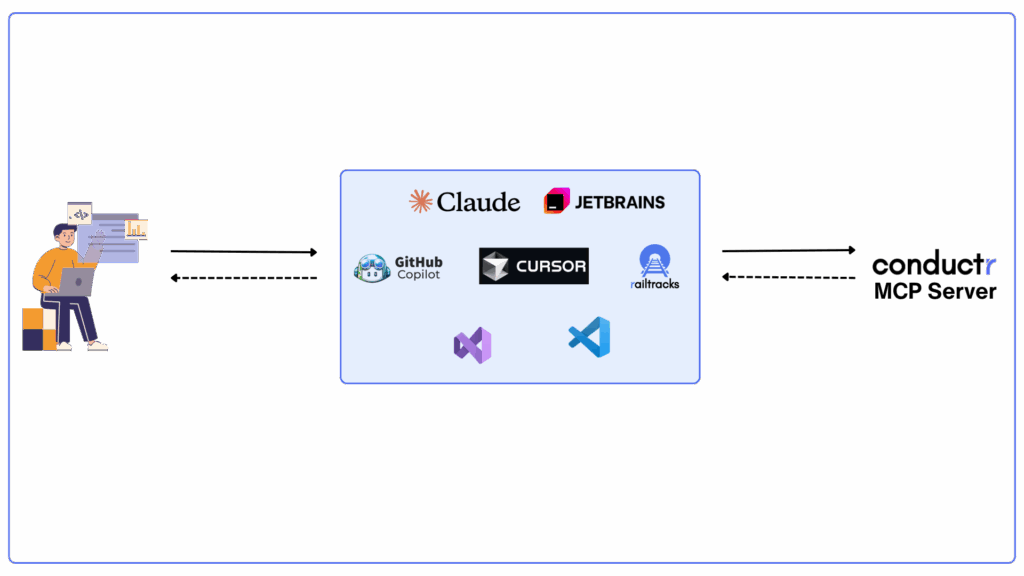

Access Conductr's AI Knowledge Engine and Error Analysis in the IDE
Leverage Conductr’s advanced analysis directly in your IDE. Developers can query Error Bucket Search to trace production issues down to their originating file, class, or commit context. Conductr’s integration also exposes a natural language interface for querying engineering knowledge and ticket history, enabling faster troubleshooting and contextual understanding without leaving the development environment.
Context-Aware Intelligence for Agents
Transform generic copilots and AI agents into contextually aware engineering assistants by supercharging them with Conductr’s deep context integration. Conductr provides access to engineering insights and ticket data from the AI Knowledge Engine, as well as error intelligence from the Root Cause Agent, allowing copilots like Claude or ChatGPT to respond with precision and project-specific awareness. This integration ensures every AI interaction is grounded in the real-time state of your engineering system, making copilots and agents true extensions of the development environment.
Key Features
Remote MCP Server with Auth Support
Secure Personal Access Token (PAT)-based authentication for external tools to access Conductr features.
Get Error Buckets by Filename Tool
Enables copilots to fetch root cause information about a file (e.g., GitHub Copilot fetches based on the current active file).
Structured Ticket Query Tools
Enables copilots to retrieve aggregated insights (e.g., “how many tickets closed by X”, “tickets by tag”).
Vector Search Tickets Tool
Allows copilots to retrieve relevant historical tickets based on semantic search queries.
Integrate Conductr MCP Server where you work: GitHub Copilot, Claude, Cursor, and beyond
Extend Conductr into any dev & AI tool through MCP
Deliver context, error analysis, and engineering knowledge wherever developers interact with AI, without additional infrastructure or custom plumbing.
FAQs
- What platforms/tools do MCP Server integrate with?Conductr MCP Server integrates with any LLM, agent, CRM, ERP, Communication SaaS tools.
- How does MCP Server handle secure transport and storage of logs and telemetry data?All communication and traffic to and from Conductr MCP Server uses HTTPS.
- Is there a chat-based “co-pilot” in the platform where I can ask for insights or code guidance?Yes. That’s exactly the role of the AI Knowledge Engine. It acts as your chat‑based co‑pilot, delivering answers grounded in enterprise knowledge. It can surface historical context, strategic insights, and technical guidance all in conversational form.
- Does using MCP Server require hosting on-prem, or is it a managed service by Conductr?It is a managed service by Conductr.
- What are the resource requirements (CPU, memory, disk) for running MCP Server in a medium-sized organization?The Conductr MCP server is a managed cloud service that can be scaled accordingly to customer needs. Customers do not need to worry about resource requirements like cpu, memory, disk.